The filing of the data (plans) determines substantially the performance of a system of geoinformation.
Moskito offers to it the plan management and the data format PV. Plans are loaded as usual as a HDF, stored etc. on the hard disk, in Moskito, however, about the format PV and are protected. The management of big data amounts is thereby guaranteed and the access is simplified.
Moreover, the plans which exist not really but on grounds of your system can be used with the help of the plan management for the processing, be generated. The plan management is used here with the pressure, while new generating and with the store by plans.
The plan management is worked on basically with the order Plan management. This is more exactly described in the functional reference.
The Moskito's variable GDS$DBB should refer to the list in which the uppermost level of the plan management is.
There are for the plan management two structural possibilities which are optimised for different data amounts:
The easy form of the plan management
She contains two levels:
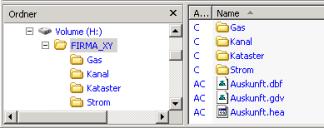
The upper level contains the level management files: *.dbf, *.gdv and a *.hea file which everybody carries for the same "Vor" names.
In the lower level are the folders which contain the plans.
Every folder is put down as a Layer on the plan management.
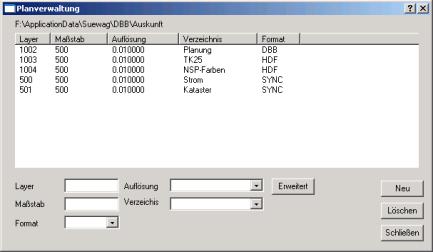
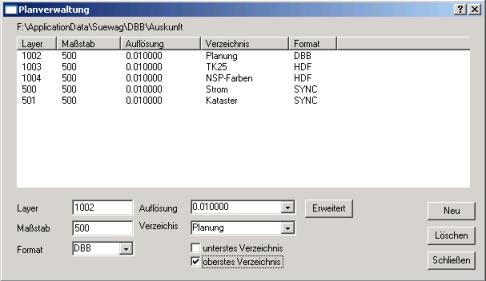
This can be done with the help of a dialogue, to itself under administering | Plans | Plan management considers:
For every Layer settings are fixed like graduation, data format, resolution, etc. Also every Layer receives an at least 3-figure, ganzzählige, positive number smaller than 60000. So that the system can distinguish inside number and name (type), the folder names should not begin with a number or number and name should be same.
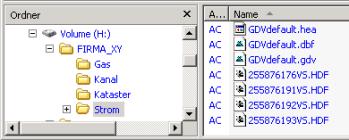
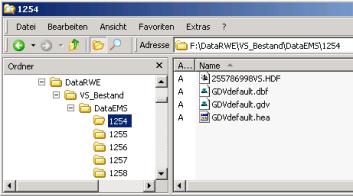
Now in the folders other administrative files GDVdefault.dbf, GDVdefault.gdv, GDVdefault.hea appear:
Now the plans can be loaded in the folders about her TYPE:
Now the plans must be still put down on the plan management.
Single plans let themselves about file | store under in the format PV protect.
For bigger larger amounts in files the use of her is recommended
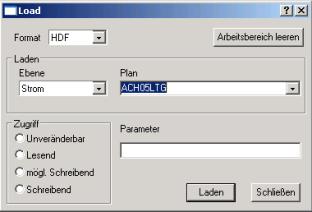
Routine Plan management ADDPLANS.
Nevertheless, a too big number of files (more than 3000) per folder requires too much time for the searching routines, so that for bigger enterprises the second form of the plan management offers.
The more complicated form of the plan management
Just as in the easy form a plan management is put on here first and the Layer are put down. The only difference is that the option hidden under the "Erweitert" badge the uppermost list must be selected.
In this case the plans are filed not in the folders of the Layer, but the folders themselves contain other folders which can be divided again into Unteroder etc., so that lie no more than about 3000 plans in a folder.
Now the structure is built up with the order Plan management REPAIR. Besides, are valid the following rules:
•If a folder (except the administrative files) contains only folder, he refers to the lying underneath lists.
•If a folder (except if necessary to a folder contains backup) only plans of the same format, he is put down as an owner by plans.
•If a folder contains files of different endings or a mix from files and folders, he is not taken up in the plan management.
The plans are not inserted by this routine yet in the plan management.
In both versions of the plan management settings are put on for the loading etc. of the plans. It can make sense, for different purposes, as for example to put on several plan management information or capture. They access in each case the same administrative files, so that no redundancy can appear.
Possibilities in the format PV: automatic plan division
Just as the number of the plans per list should not cross a maximum value in the loading times to minimise, the number of the objects in the plan should also not cross a maximum value. Because this maximum value is also dependent on the kind and number of the components, no universally valid recommendation can be given here.
The automatic plan division becomes only active, if the system variable SYSTEM.Formate. PV.Save. MaxObjects with a positive, ganzzahligen value is booked (order: InitializeParameter)
Should a plan be protected then which contains more than the number given in the variables in objects, he is automatically divided and named. Besides, fixed plan dimensions and name conventions are kept. The new plans receive a prefix from the first both letters of the Layers and a low line. There follow the figures which are formed from the co-ordinates according to firm rules:
Fixed plan dimensions and name conventions for the PV:
Width |
|
Height |
Name |
|---|---|---|---|
1000000 |
x |
1000000 |
prefix_<x1><y1> |
100000 |
x |
100000 |
prefix_<x1><x2><y1><y2> |
10000 |
x |
10000 |
prefix_<x1><x2><y1><y2><x3><y3> |
IN 1000 |
x |
IN 1000 |
prefix_<x1><x2><y1><y2><x3><x4><y3><y4> |
500 |
x |
250 |
prefix_<x1><x2><y1><y2><x3><x4><y3><y4 >[1-8] |
250 |
x |
125 |
prefix_<x1><x2><y1><y2><x3><x4><y3><y4 >[1-8] [1-4] |
125 |
x |
62.5 |
prefix_<x1><x2><y1><y2><x3><x4><y3><y4 >[1-8] [1-4] [1-4] |
Condition is present that the plan ""lies in his Layer in an unterfolder with the name "maps". The new plans """"are filed in an unterfolder "beside" the folder "maps" which bears the name of the original plan without prefix and in it again in a folder "maps".
During the division it is checked whether the plans to be generated already exist and if necessary these are loaded, or an error message are given if they are closed. Data can be thereby added also to an existing continuance. Afterwards the objects are shifted in the origin plan in the new, smaller plans. If all objects were shifted successfully, the old plan is removed.
If objects could not be shifted in suitable plans because they lie, e.g., beyond the plan borders or belong to a plan which could not be loaded, the origin plan with these objects is preserved. Then, however, the plan should be loaded afterwards with the suitable surroundings plans and the objects with "RelayerObjects" be redistributed.
To handle performance bottlenecks with big data amounts, the system variable SYSTEM.DeleteSplittedPlans can be put on the value 1. Then the reloaded plans resulted anew are removed on distributing from the field of work, so that the amount of the Ojekte still to be distributed always decreases.
Also the automatic plan division with the construction of the plans can generate immediately a sheet frame, a line on the borders of the plan. In addition the object key, comma, Drawing-Key (DKY) is deposited in the system variable SYSTEM.Autorahmen. Bsp.:
InitializeParameter SYSTEM.Autorahmen 158.10
The sheet frame object receives the key 158 and the edge line the DKY 10.
If the variable is not defined or empty, then no sheet frame is generated.