The representation of the data can be modified in Moskito G SHARP to a great extent. This happens, on the one hand, about the signature tables which are treated at other place. On the other hand over the window Darstellung|Anzeige. Corresponding moreover there is the window same to function Darstellung|Plotter with which the settings happen for printing. The window for influencing of the representation is made up of the following parts:
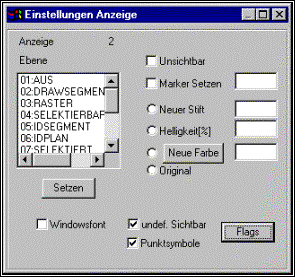
Levels
Here the Ersteinung is fixed by objects in different states. The states are graded, a setting for the state from (01) is headlined by the state grid (02). Though a selected object is also selectable, it takes over the settings, however, from selects, because this quality higher lies. Some state numbers are free for later enlargements. All together there exist the following states:
Number |
Name |
Meaning |
01 |
From |
Objects in plans and segments, Were switched off, are indicated with these settings. It is switched off about the menu Verwalten|Layer|Schalten. As a default is to be recommended here Invisibly. |
03 |
Grid |
The grid elements which lie in switched off plans can be differently indicated than the remaining elements. Thus a grid can be shown in an authoritative plan, although the plan itself is invisible. |
04 |
Selectable |
This concerns objects which lie in selectable plans, but are not selected. As a representation either a grey value or an Abschattung with diminished brightness has proved itself. |
07 |
Selects |
This are normal, selected objects. Original is urgently to be recommended as a setting, because, otherwise, the signature tables do not work. These are headlined by the announcement settings. In special cases a setting can be also necessary here, possibly if a selection was built up and this should be made visible only efficiently. Moreover, about this level achieved can become that all selected objects become invisibl. |
08 |
IDobjekt |
The identified object, but not the identified element appears according to this regulation. Sensible it are here mostly a new colour which is seldom used in the plan work. In addition, a marker symbol should be used. |
09 |
IDelement |
The identified element appears according to this regulation. Sensible it are here mostly a new colour which is seldom used in the plan work. In addition, a marker symbol should be used. At least the marker should be different than with the settings IDobject |
10 |
IDpunkt |
For the identified point only one of the marker allocations makes sense, because the point itself owns no line stamping, all the other settings do not work. |
12 |
Highlight info |
Functions like OSO/OpenSelectedObject point out the user with this stamping to an object / element. A colour, if necessary with marker, which does not appear often in the plan work should be used here. The signal colour should be booked Red for the next point. |
13 |
HighlightDel |
it is used if an Objekt/Element/Punkt should be extinguished to receive a confirmation with the user. Here has proved itself Red with additional red points as a marker. |
Special Flags
Three special, often used Flags are already adjustable in this dialogue. If other than 3 Standardflags must be supposed to be changed this in the unterdialogue Flags happened.
•It is regulated whether is used with the drawing of the Windowsfont
•It can be chosen whether undefined signatures are drawn or whether they are invisible. With signature tables in the SIG format the drawing is switched off, switched on with DLT tables. In addition there is in the dialogue Flags an other setting with which invisible can be also excluded from identifying.
•It is regulated whether point symbols are drawn. This is above all a speed question, because a lot of thousand circles from market to border points the image format strongly brake.
Call of the untermenu Flags
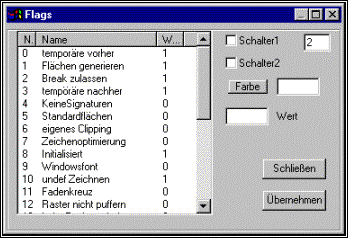
About the badge Flags the unterdialogue can be reached for the counters of the announcement with which the remaining settings can be changed for the issue. The Flags become if G SHARP enlarged runs to the advancement of Moskito. The entire sentence is always described in the table manual.
The untermenu Flags