In the following it is described how a sheet frame is generated in the HEA or symbolic format. The frame will have a size of 20 * 20 cm. He should be accessible under the name R20x20.
Every frame must have beside the name also a number. This number must be unambiguously within the loaded frames. The new frame is led at the number 23.
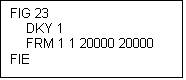
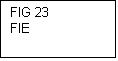
Accordingly a file R20x20.hea is put on in the list moskito\rahmen\header with the following contents:
This frame is empty and also generates no data in the drawing. With it the sheet frame a frame line is used obviously. This must occur with a correct sign key (DKY). In the demo data tables DKY 1 is used in each case as a black line. The information of co-ordinates occurs in 1 / 100tel. mm. As the smallest value may be used under Windows 1.
Load this frame now about "LUT HD R20x20" in Moskito. The question after "old people extinguish" you answer with. If you must want to load several sheet frames you from the 2nd frame with answers. Indeed, the whole sequence must be loaded with the store of a frame which is already loaded in the field of work anew, because the 2nd store does not become effective.
They can see your frame, while you choose Datei|Drucken, the frame select and with the mouse in the graphic arts window go.
However, while printing only the frame appears up to now. The plans are not used yet. As the next must be informed of the system therefore, how big the sign area is and where he lies. This happens about an other frame.
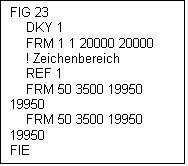
To this frame becomes as a mark for the fact that he is not drawn, but is used as a pressure area, a REF 1 prehired. The frame becomes a little smaller to let still place for administrative information. Because the 2nd frame should be visible, in addition, the FRM line must twice seem., On the one hand, is you mark of the sign area, on the other hand line.
Comments are able at every place with one"!" are initiated and then are valid up to the end of the line. They should make of comments richly use.
As the next the plan should get a date. There are here several variations. They can use the topical date, so the pressure date, the date of the last protection or the date of the first protection.
current date |
$SysDat |
date of last change in content. The latest value of feature value $D2 will be used. |
$ContentDate |
date of last save |
$D3 |
date of last save with real data changes |
$D2 |
date of first save/creation |
$D1 |
To realise this several steps are necessary:
•Putting of the text height
•Are economical of a firm text
•Are economical of the date.
The text height is put with the line TXI 300 and the parametre value 300 gives the real height of the text again in 1 / 100tel. millimetre.
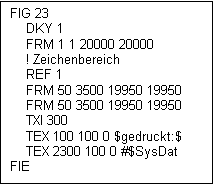
The height is measured without unterlengths. There follows the firm text. He has to go "in print:" are and below on the left are put. beside position and text one more direction is necessary, here 0. The direction is calculated in 1 / 100tel. old degree. This information is not evaluated at the moment. The firm text is enclosed in $ sign. A variable text is not enclosed against it, but receives a #-Zeichen is introduced. The following variable texts are defined:
•All sheet head attributes
•1:SCALE and SCALE for the issue of the graduation
•$SysDat for the topical date
Sheet frames in the HDF format are described in the table manual.