This mask contain the settings of a configuration, so in our case special plans or continuance. These are above all the Layer, so the great structure of the data, and the searching mechanisms agreedly.
A Layer are, besides, one or several lists in which data of a type have been filed. Then these data can be demanded under a category.
Searches serve discovering of positions and data. In addition Moskito of a data bank helps itself. In this data bank the keys and the position the area must be filed to every searching mechanism.
1 |
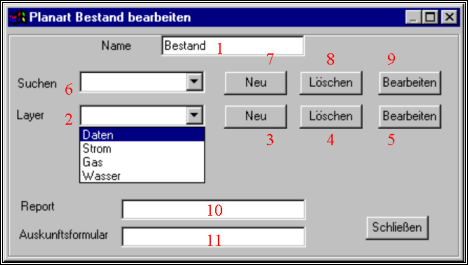
The name of the configuration is returned in this field, so in this case continuance or special plans. The entry cannot be changed. If the name of a configuration should be changed, this must be extinguished and be generated anew. |
2 |
It becomes a list of Layern in which the data of the information station are ready. This are normally sheet types, so lists. Names are assigned to these sheet types. The user can switch on or switch off later a sheet type with a click. It should not be summarised too big areas into a Layer. On the other hand, too many Layer are also annoying. The division Strom/Gas/Wasser/Kataster or 110 kV, 20 kV, 1 kV have proved themselves. The mechanism of the searches is ready (6-9) for the finer subdivision. Because Layer always whole plans is contained one with the arrangement also to the physical data filing engagedly. In this field the name of a new Layers is put down, the name of a Layers to be extinguished is selected or the name of a Layers is selected for the treatment. |
3 |
To put on a Layer anew the name of the Layers must be put down before on (2). Then the Layer is able to come with (3) are put on and are changed (5) in such a way that he provides the desired data. It can be put on of course only a Layer if this name is not awarded yet. |
4 |
A Layer which has been clicked in (3) can be removed with (4). |
5 |
By clicking before (5) you reach in the mask „Layer work on“ to change the qualities of a Layer. The Layer Must be clicked in (2) or be put down. |
6 |
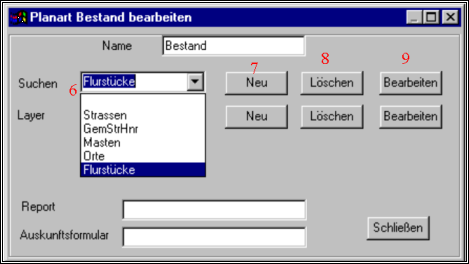
Here are given the name of a search or abgeklickt. Searches and Layer may contain the same names, it is not possible to lead 2 searches in a plan kind under the same names. |
7 |
If a new name was put down in the field (6) Search, this can be fixed with (7) as a new search. The system asks immediately which kind of search should be furnished. The three-stage Gemeinde/Strasse/Hausnummer search, The object search and the level group search are available. If a name is twice given, appears an error message. To change a search in another kind the search must be extinguished and be generated anew. |
8 |
A search which was clicked in (6) can be removed with (8). |
9 |
The remaining parametres except the searching kind are not questioned while putting on the search. On putting on with Anew (7) the parametres with (9) can be complemented. According to searching kind appears one of the masks „set-up of object search“, „set-up of level group search“ and „set-up of GSH search“ |
10 |
There is the possibility to let fill a firmly furnished file with a report. The mechanism will be extended, so that the entry is not necessary any more, but a choice list with available report appears if the user liked to print the report. |
11 |
While printing an information form with can be printed out. This form is named here. The name may contain a path, then the ending of the file is changed. An information without path is better. Then the file is searched as a RTF file in the list GDS$Report, is filled and filed in the list GDS$Result, or is coprinted immediately |