This mask contains global settings. This are the different configurations of the information station, functions to the store, memories and changing the configuration.
1 |
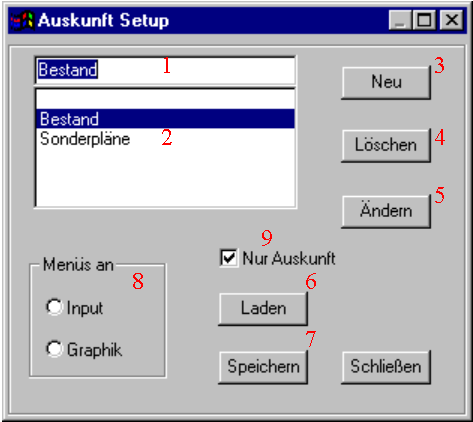
The configuration which is performed in the text field 1 is applied by the next program start. Up to the next start of Moskito the old menus remain active. Here a value must be (selected) from 2 given. If a new configuration should be generated, their name must be put down first on 1. Only one configuration usually exists, so even an entry in the field 1 and 2. |
2 |
If a list with possible configurations includes. The entries are generated, while a name is put down on field 1 and then the new badge is operated. One can remove an entry from 2, while the entry is selected and then the extinguishing badge (4) is operated. |
3 |
After put down of a new name on (1) a new configuration can be generated. The configuration is empty at the beginning. |
4 |
A superfluous configuration can be removed with (4) again. There is no topical configuration after the extinguishing, so that the information station is not functional by the next start. It must be selected in (2) again a topical configuration. |
5 |
by this badge you reach in the mask for changing of the data of a configuration. (####) |
6/7 |
The settings of a meeting can be stored. They are put on in a Batch file and by explain of the Batchdatei again are loaded. "AuskConf.cmd" is called the Batchdatei in the list Moskito\rahmen\batch\once. After the securing of the settings are used these of all other users who put on a new Workfile with Moskito. By can load a "broken-played" version again on the state of the last protection are brought. The topical version is provided by memories for all the other users. |
8 |
It is selected whether the menus of the information in the graphic arts window or in the input window are suspended. Default is the input window. Normally a real information station with menus in the graphic arts window will run. With a capture station it can make sense to move the menus ouch the input window on the 2nd screen. This should not happen with real information, because the input window can be closed and then no possibility exists to make this again visible. The menu in addition is also invisible, finally. |
9 |
It is put whether the menus of the information are realised as top level entries or as unterentries of the menu Extras. The first case (with selected „Only information“) is used if the information station serves only as those. The second case generates a considerably smaller top level menu and is intended for a capture station with Nebenfunktion information. |