Arrangement of a FILEDSN
•Provide on any calculator an ODBC spring (a user's data spring may be)
•Provide a new file data spring. This needs an ODBC spring as a reference with the construction.
•Edit the data spring. Now this file can serve as a presentation for all other data springs with this driver. Absolute paths are often necessary. Also a disk drive letter is necessary. With relative paths must be calculated from the topical list, so moskito\main.nt, even if the DSN file does not stand there.
Example of a FILEDSN
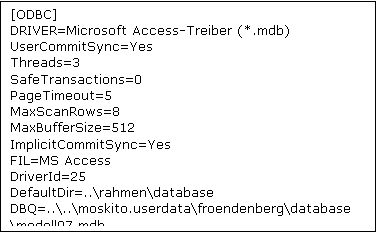
Komandointerface:
SQLconnect Information Bandaging with the SystemDSN or UserDSN
SQLconnect FILEDSN=c:\Auskunft. DSN Bandaging with a FileDSN. The DSN must be demanded later about "SQLquery FILEDSN=c:\Auskunft. DSN". SQLconnect FILEDSN=c:\Auskunft. Alias / information DSN Bandaging of a FileDSN. The spring is demanded later about the name information. |
Surface
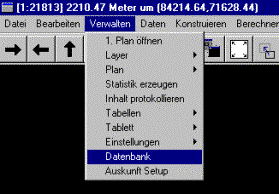
Call about menu Verwalten|Datenbank
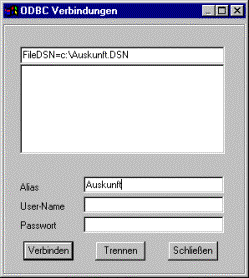
Eintagen of the ODBC name or the file name, if necessary with alias information
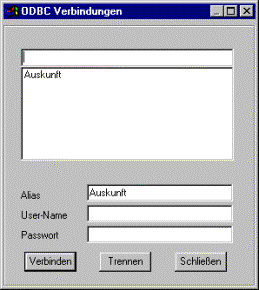
In the result appears only the alias name
Tip:
The FileDSN also contains the name of the driver which depends, unfortunately, on language of the ODBC package and is not enterprise-far universal, therefore. Simply produce 2 FileDSN for German and English and connect successively with both. Only the DSN functions for the valid name, the other is turned down. If both drivers are installed, the 2nd connection is turned down, because already a connection is built up.
So that a connection with an Accessdatenbank must can earth System-far built up them about a uniform disk drive letter occur. Accessdatenbanken always need a disk drive, net names do not function. Moreover, the disk drive and the release must be writeable. It is enough writing right on the list of the data bank, the file itself can be write protected.
Capitalisation and use of small letters is irrelevant.