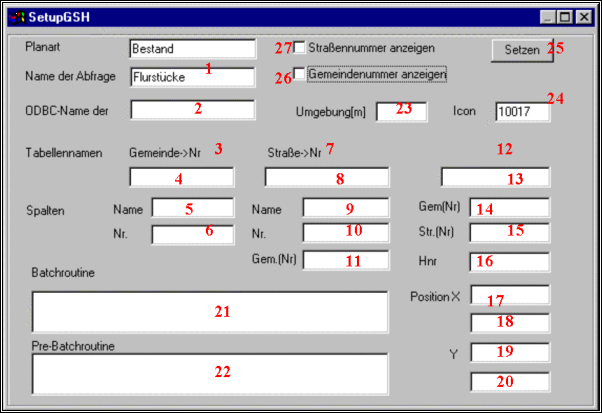
The search GSH is the most complicated one of the available searching methods. Depending on which tables are put down it concerns a two-stage search (local field part) or a three-stage search (local street house number). It is regulated whether in the table with the co-ordinates as local names the name itself is put down or an index which is taken from an other table. The same is valid for the streets. With the streets is regulated whether the street numbers are unambiguously over all places or need the local buzzers as an additional criterion.
1 |
The name of the plan kind, as well as the name of the search is returned here. Changing is not possible. |
2 |
The name of the data spring ODBC. This is the name or the alias with which the data spring was connected (SQLconnect). It is not checked with the registration whether the spring is available. With later using the data spring about SQLconnect or the menu Verwanlten|Datenbank must be connected. |
3 |
This table is optional and gives an allocation of local numbers on local names. If the table is not given, the local names stand directly in the tables 7 and 12. If here a table is given, only numbers stand in the tables 7 and 12 instead of the names. Then the fields 4, 5 and 6 must be filled everybody. |
4 |
Here the name of a query or table which carries out a conversion between local name and local numbers is put down. |
5 |
The name of the column in the table 4 which contains the local names. The contents of this table are indicated in the dialogue as local names. |
6 |
The name of the column in the table 4 which contains the local numbers. It must concern here also figures. Texts with letter or special character are not allowed. |
7 |
This, with the fields 8,9.10 and 11, is a table with which street numbers are moved in street names. If the table is not given, the street names exist immediately in the table 12. If the table is given in 8, the fields 9 and 10 must be also filled. |
8 |
Name of a table or query, the columns for street name and street numbers, optionally also for local names / numbers includes. The names of the columns are put down on 9.10 and 11. |
9 |
Name of the column for the street name in the table 8. The contents of this table are indicated in the dialogue as street names. |
10 |
This column contains the street numbers to the street names from column 9 in the table 8. The numbers must be unequivocal if the column 11 is not filled for the local names. |
11 |
This column is optional. If she is filled, the street numbers are unequivocal only in every place, the column is not filled, the column within the whole searching mechanism is unequivocal. This column contains the local numbers if the table 3 exists, but the local names are put down here. |
12 |
This is the central table of the search. Here house number a position or an area is derived from place, street and if necessary. This table contains at least 4 columns for place and street, as well as a column for x and Y portion of the co-ordinate. The other entries are optional. |
13 |
The name of the table or query which contains the positions for every street / house number. The names of the columns in this table are fixed in the fields 14-20. |
14 |
Name of the column for the local number if the table 3 exists. or Name of the column for the local name if the table 3 does not exist. |
15 |
Name of the column in the table 13 on which the street names or street numbers are put down. These are street names if the table 7 does not exist, street numbers if this table exists. |
16 |
Optionally, name of the column in the table 13 Which contains the house numbers to the streets. If this column leaves empty the searching mechanism is only 2-stage. |
17 |
Name of the column for the first X component of the co-ordinate. This must be put down. |
18 |
Name of the column for the second X component of the co-ordinate. This is optional. If she exists, an area is loaded in each case. But is gone out from single points. |
19 |
How 17 for the second Y component |
20 |
How 18 for the second Y component |
21 |
The name of an order or a Batchdatei which is explained before the store of the plans. Only one order can be given. The field is optional. |
22 |
Name of the order which is carried out after the announcement of the searching window. In this the names can be changed by fields in the searching mask or parts invisibly be switched. Any other actions can be also carried out. The field is optional. Only one order / Batch can be carried out. |
23 |
Here surroundings can be given around the area ascertained in the data bank which are also indicated. This is in particular necessary if not an area, but only one co-ordinate is searched. Then it are indicated n metre, in addition, around the found area. If the surroundings are chosen too largely the found object cannot be identified, on the one hand, any more unambiguously. To others the loaded data amount is raised needlessly. |
24 |
Normally searching binoculars are used as an Icon to indicate the search in the tool bar. Instead of this every other available Icon can be put down (see below). 0 causes that no Icon appears in the tool bar. Then the search is accessible only about the Pulldownmenü under searches. |
25 |
With this badge all changed settings are taken over and written in the suitable variables. If the X badge is pressed, the mask will leave without memories of the changes. |
26 |
This point is intended for future enlargements and not yet completely implemented. He will indicate the number of the well-chosen place if the table 3 exists. |
27 |
This point is intended for future enlargements and not yet completely implemented. He will indicate the number of the well-chosen street if the table 7 exists. |
Tip:
Even if in the above explanations always from places, street names and house numbers the speech is this only one possible use of the search fixes. It can also concern around places / field parts, countries / places or an other, 2 3-stage search. The only condition is that the 2nd step is a refinement of the first step and if necessary the third step a refinement of the 2nd step.