The mask „set-up of object search“
The search object is simply a single-step search. The user receives a mask in which a list is performed by name in a combo box. He selects a name and the announcement position is put to the position / area which is given for this object in the data bank. Then become after state of her
Layer badges the necessary plans loaded.

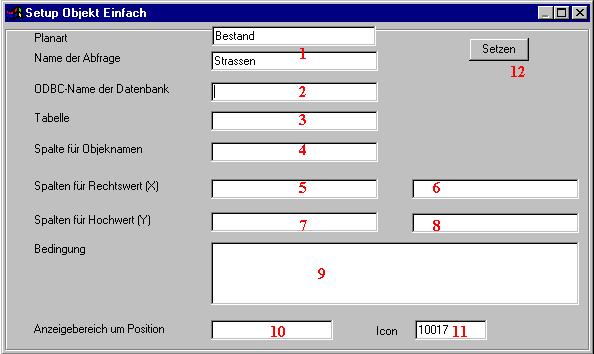
1 |
The name of the plan kind, as well as the name of the search is returned here. Changing is not possible. |
2 |
ODBC name (or alias) of the data spring which contains the table with the object names and positions. |
3 |
Name of the table (or query) in this data bank which contains the objects |
4 |
Name of the column in the table in which the object name is included. All objects are inserted in the later searching mask. It should not exist too many objects in a query, because then the build of the search lasts too long. |
5.6 |
Name of the columns in the table 3 which contains the X co-ordinates of the objects. Because an object an area must can be 2 columns are put down (on the bottom left and on the top right). If only one information is available this column can be put down on both fields. |
7.8 |
how 5 and 6, only for the Y co-ordinates |
9 |
If this field is filled the contents are put down on the SQL query under WHERE. With it a choice can be carried out in a table. It can be generated instead of this also in the data bank even a query with this condition and this query then as a table on field 3 be put down. |
10 |
Here surroundings can be given around the area ascertained in the data bank which are also indicated. This is in particular necessary if not an area, but only one co-ordinate is searched. Then it are indicated n metre, in addition, around the found area. If the surroundings are chosen too largely the found object cannot be identified, on the one hand, any more unambiguously. To others the loaded data amount is raised needlessly. |
11 |
Normally searching binoculars are used as an Icon to indicate the search in the tool bar. Instead of this every other available Icon can be put down (see below). 0 causes that no Icon appears in the tool bar. Then the search is accessible only about the Pulldownmenü under searches. |
12 |
With this badge all changed settings are taken over and written in the suitable variables. If the X badge is pressed, the mask will leave without memories of the changes. |