The mask „set-up of plan groups“
In contrast to the other searching mechanisms with which is searched for a position or a cutting firm file names and amounts from files are loaded with the level group search. If the data are enough in a list Local manner of a name convention (DO* for Dortmund, WI* for Witten), all plans of Dortmund or all plans of Witten can be loaded with the level group search.
To the arrangement of this searching mechanism a data bank with at least 2 columns is necessary. One of the columns contains the name of the groups, so in this case the names "Dortmund" and "Witten". The other column contains the common name component of all plans of a group, so here "TH" and "WI". The names of the columns are freely eligible.
Abbreviations |
Name |
TH |
Dortmund |
WI |
Witten |
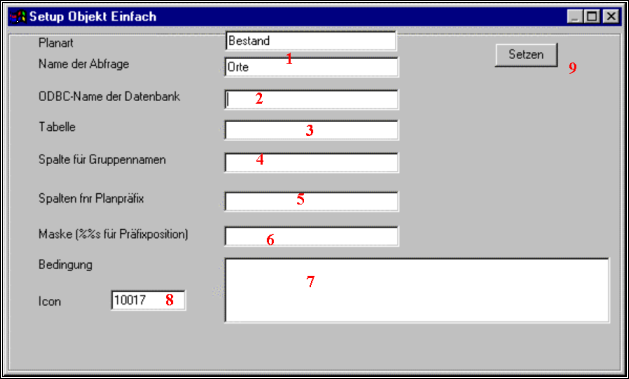
To furnish the search completely the following registrations must be carried out.
1 |
The name of the plan kind, as well as the name of the search is returned here. Changing is not possible. |
2 |
The name of the data spring ODBC. This is the name or the alias with which the data spring was connected (SQLconnect). It is not checked with the registration whether the spring is available. With later using the data spring about SQLconnect or the menu Verwanlten|Datenbank must be connected. |
3 |
The name of the table or query in which the pairs (abbreviation, name) are stored away. |
4 |
The name of the column in the table (3) on which the names of the groups, so "Dortmund" and "Witten", are put down. |
5 |
The name of the column in which the abbreviations, are accommodated so "TH" and "WI". |
6 |
A text with which a regular expression is formed in which the abbreviation column is substituted by %% see. If the plans are called WI001, WI002, etc., can be put down here %% s*, so that either all plans whose name begins with WI or their name with TH are loaded. If all plans are in a complicated case in a list and differ the stream plans by prehired S., gas plans by 1 g, the mask „S. %% see * “can be |
7 |
Here a SQL condition which is suspended to the query of the plan name can be given. It is mostly easy to give a query instead of this as a table immediately. |
8 |
Normally searching binoculars are used as an Icon to indicate the search in the tool bar. Instead of this every other available Icon can be put down (see below). 0 causes that no Icon appears in the tool bar. Then the search is accessible only about the Pulldownmenü under searches. |
Tip:
The name of a search can be changed, while the configuration of the information is protected and then all variables in their names the old searching name appears, is renamed in a text editor. Further the new name must be put down in the list of all searches. Then the configuration can be loaded again.