The data of an information station are organised in Layern which are very similar to the sheet types or Layern of the Moskito of base system. It can be bundled up in a Layer of the information station several sheet types by Moskito. Within a Layer the selections which separate the loaded objects in groups can be put on. The selections should not overlap to protect the user against appearing inconsistencies. The Layer can be switched on and switched off as a whole. The information station provides for this the mask „Fenster|Layer switch“ and if necessary per Layer an Icon in the tool bar. The Icon is only put on if the Iconnummer are not 0. For the selections are put on also Icons.
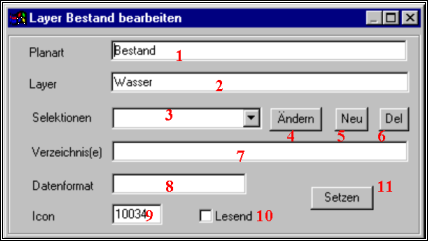
1 |
Name of the plan kind for which the Layer is valid. It usually is only one plan kind, defined so a configuration. |
2 |
Name of the data which belong to this Layer. This name appears in the badges and dialogue boxing with which the plans this Layer are activated. |
3 |
Name of a selection. In the choice list stand the available selections, a new name can be also put down to put on an other selection. |
4 |
Before operating this badge a selection from the list 3 must be chosen. Then the mask appears to the adjusting of the parametres for selections. In this mask the selection can be more exactly specified. To put on a new selection the name must be put on first in 3 registered, then this with anew, and be put last with changing (4) the parametres. |
5 |
After the registration of a new name in the box 3 this is fixed with the badge 5 as a selection. The names of the selections may seem in several Layern. The selection is put on only blank and must still become with 4 parametrisiert. |
6 |
A defined selection can be extinguished, after it was selected in the field 3. |
7 |
Here a sheet type in which the plans are filed so about 150 is put down. Several can be also put down, by comma separate types. Then the contents of the field are 150,170th blank may not be contained. |
8 |
Name of the format in which the plans this Layers are stored. There can be for a Layer only one format. As a format it is simply given DBB, DXF, or similar. |
9 |
Normally searching binoculars are used as an Icon to indicate the search in the tool bar. Instead of this every other available Icon can be put down (see below). 0 causes that no Icon appears in the tool bar. Then the search is accessible only about the Pulldownmenü under searches. |
10 |
The plans of a Layers can be loaded alternatively reading or writing. In an information station the standard case is reading, because the surface also makes sense for capture stations then must be writing put down if necessary, so that the loaded plans can be later also protected. |
11 |
With this badge all changed settings are taken over and written in the suitable variables. If the X badge is pressed, the mask will leave without memories of the changes. |