Within a Layer object groups can be formed. These are named selection. A selection exists of a list of object keys. If several object keys can exist in an object, the administrator must pay attention to the fact that the selections within a Layer do not overlap. With a selection all objects of the Layer are selected first and then all objects for which the respective selection is switched off, deselektiert. With a selection are regulated only The Icon and the list of the object keys.
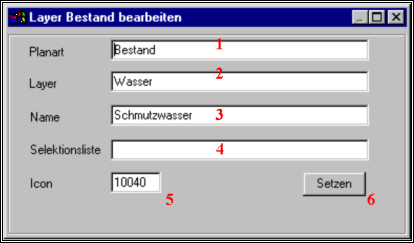
1 |
Name of the plan kind for which the Layer is valid. It usually is only one plan kind, defined so a configuration. |
2 |
Name of the data which belong to this Layer. This name appears in the badges and dialogue boxing with which the plans this Layer are activated. |
3 |
Name of the objects for this selection. This name will switch in the dialogue box to the switching of the objects „Fenster|Layer“, and as a context help in the badges of the tool bar registered. |
4 |
A list is given by object keys and key areas. This list is used to remove the objects from the selection amount if the selection is deactivated. Valid values are 1-5,7,9 or 1,5.8 or 1-5,7-12 etc. As soon as one of the given keys in an object available is it is looked as a part of this selection. |
5 |
Normally a management cutting is used as an Icon to indicate the search in the tool bar. Instead of this every other available Icon can be put down (see below). 0 causes that no Icon appears in the tool bar. Then the search is accessible only about the Pulldownmenü under searches. |
6 |
With this badge all changed settings are taken over and written in the suitable variables. If the X badge is pressed, the mask will leave without memories of the changes. |