They can provide editors in Moskito masks for own dialogues with the help of a dialogue and Button the single elements of the dialogue (etc.) in a text editor Moskito's functions assign.
The dialogue editor
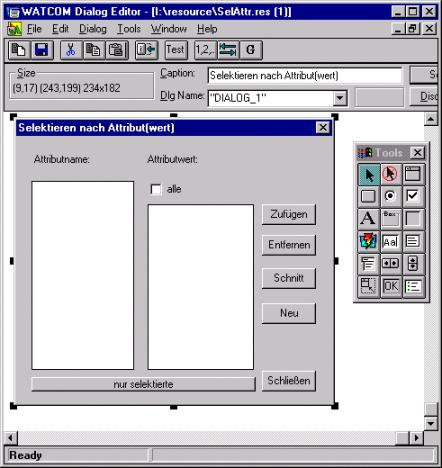
As the first step the mask, i.e. the real surface is provided without functionalities, with the help of a dialogue editor, e.g., with the Watcom resource the editor who can be downloaded on the homepage by Watcom free of charge.
He hides on the side http://www.openwatcom.org/zips.html in the folder ide_binnt.zip
The resource editor is of the wre.exe, the dialogue editor is of the wde.exe.
From a menu with tools the single elements can be added with it like buttons, cunning boxing, texts etc. to the dialogue. The ready mask is stored. There originates a text file readable with any editor with the ending.dlg.
The format of the dialogue file
Dialogues are stored in Moskito as text files with the file ending "*.dat" in the list Moskito\Ramen\Messages. They are called about the function MakeDialogBox (see also functional reference). They are unambiguously defined over the dialogue number in combination with a dialogue name. As a rule the dialogue name is simply "a dialogue" (example: Case A). If by the production of a new dialogue should become indeed gone that a dialogue number will award not by mistake twice, one can change this dialogue name also (example: Case B).
All dialogue definitions are searched by the system in the message list, besides, it makes no difference whether all definitions are in one or in several files with different names, only the file ending ".dat" and some formal structures is important:
The text sequence in which the mask is defined becomes by the sign result
--- <Dialogname>Define <Dialog-ID>
initiated. There follows the text sequence provided with the help of the dialogue editor which becomes from the text file mentioned on top with the ending.dlg herüberkopiert. Have to go the dialogue later with the Moskito's order
MakeDialogBox 122
be callable (case A), there is the prefatory sign result
--- DialogDefine 122
Have to go the dialogue later with the Moskito's order
MakeDialogBox 122 name / attributes
be callable (case B), there is the prefatory sign result
--- AttributeDefine 122
Attention: in the case B is to be respected to the same capitalisation and use of small letters!
Example of the text sequence in which the mask is defined:
--- DialogDefine 122 DIALOGUE DIALOG_1 DISCARDABLE 15, 23, 234, 182 STYLE DS_MODALFRAME | WS_OVERLAPPED | WS_CAPTION | WS_VISIBLE | WS_SYSMENU CAPTION "Select after attribute (worth)" FONT 8, "Helv" BEGIN CONTROL "Attribute name:" 101, "STATIC", SS_LEFT | WS_CHILD | WS_VISIBLE, 13, 11, 55, 8 CONTROL "Attribute value:" 102, "STATIC", SS_LEFT | WS_CHILD | WS_VISIBLE, 97, 11, 59, 8 CONTROL"", 103, "CUNNING BOX", LBS_STANDARD | WS_CHILD | WS_VISIBLE | WS_BORDER | WS_VSCROLL | WS_TABSTOP, 11, 30, 76, 131 CONTROL"", 104, "CUNNING BOX", LBS_STANDARD | WS_CHILD | WS_VISIBLE | WS_BORDER | WS_VSCROLL | WS_TABSTOP, 97, 46, 79, 114 CONTROL "everybody", 105, "BADGE", BS_AUTOCHECKBOX | WS_CHILD | WS_VISIBLE | WS_TABSTOP, 99, 31, 63, 10 CONTROL "Add", 106, "BADGE", BS_PUSHBUTTON | WS_CHILD | WS_VISIBLE | WS_TABSTOP, 182, 46, 40, 14 CONTROL "Removing", 107, "BADGE", BS_PUSHBUTTON | WS_CHILD | WS_VISIBLE | WS_TABSTOP, 182, 67, 40, 14 CONTROL "Cut", 108, "BADGE", BS_PUSHBUTTON | WS_CHILD | WS_VISIBLE | WS_TABSTOP, 182, 90, 40, 14 CONTROL "Anew", 109, "BADGE", BS_PUSHBUTTON | WS_CHILD | WS_VISIBLE | WS_TABSTOP, 182, 114, 40, 14 CONTROL "Fastenings", 110, "BADGE", BS_PUSHBUTTON | WS_CHILD | WS_VISIBLE | WS_TABSTOP, 182, 160, 40, 14 CONTROL "only selected", 111, "BADGE", BS_PUSHBUTTON | WS_CHILD | WS_VISIBLE | WS_TABSTOP, 11, 164, 166, 10
|
If a text sequence stands like in the above example in a file with the ending.dat in the message list, now the dialogue can be already called from Moskito. So that Moskito can access new or changed dialogues, these must be stored away of course. In addition, the order has to go in Moskito
Echo/rehash
in the command line are given.
To the appearing dialogue are absent at the moment, however, still any functionalities. These must be defined for every desired dialogue field in suitable text sequences in the dialogue file. These text sequences in which the dialogue field actions are determined exist of a sign result in the format
--- <Dialogname>Exec_<Dialog-ID> <Feld-ID>
and the Moskito orders standing in the following lines. The text sequence ends with a space. Beside the usual Moskito's orders of the command language and computer language can be used here also the so-called „local functions“ (see Administratorhandbuch|Programmreferenz) and the special structures the „dialogue and Menüsprache“ (see Administratorhandbuch|Programmreferenz).
An exception forms here the following text sequences.
With the sign result
--- <Dialogname>Exec_<Dialog-ID> 0
initiated one says that the following orders should be processed immediately while opening the dialogue so, for example, in order to fill cunning boxing or to make other pre-settings. Here are valid neither the „local functions“ nor the special structures the „dialogue and Menüsprache“.
The second part of the above example would look thus:
--- DialogExec_122 0 io_fillListbox 122 103 s_uniq (s_sort (DBquery ($name from attrib/noq))) io_checkDialogEntry 122 105 1
--- DialogExec_122 103 io_emptyListbox 122 104 io_fillListbox 122 104 s_uniq (s_sort (DBquery ($attr. % % - $ value from object/noq))) io_checkDialogEntry 122 105 1
--- DialogExec_122 104 io_checkDialogEntry 122 105 0
--- DialogExec_122 106 FindByAttributes/OR "%103c % / %? (checked (105))? :( (*) %104c %) %"
--- DialogExec_122 107 FindByAttributes / NEED "%103c % / %? (checked (105))? :( (*) %104c %) %"
--- DialogExec_122 108 FindByAttributes / and "%103c % / %? (checked (105))? :( (*) %104c %) %"
--- DialogExec_122 109 FindByAttributes "%103c % / %? (checked (105))? :( (*) %104c %) %"
--- DialogExec_122 111 io_emptyListbox 122 103 io_fillListbox 122 103 s_uniq (s_sort (DBquery ($name from attrib/noq))) io_emptyListbox 122 104 io_checkDialogEntry 122 105 1
--- DialogExec_122 110 _WindowCloseMenue 122
|
--- <Dialogname>Exec_<Dialog-ID>-1
This action is carried out if the help badge is called. If this is not the standard action explained is defined. To carry out no help an empty sequence-1 must be inserted.
--- <Dialogname>Exec_<Dialog-ID>-2
The following sequence is explained with the fastening of the dialogue, even if he about this  it is closed.
To the typical orders which are used in dialogue files, see the also functional reference and the chapter Menu and Dialogsprache.
Specific features of single fields
Single kinds of the fields in dialogues need a special treatment. This reference describes these specific features.
Field Edit
CONTROL"", 105, "EDIT", ES_LEFT | ES_AUTOHSCROLL | WS_CHILD | WS_VISIBLE | WS_BORDER | WS_TABSTOP, 149, 47, 32, 12
•Tip entry
An empty field Edit can be provided with a tip text. In addition the text field is filled with contents (better: It is already provided in the dialogue definition with this). Then this tip text is renamed to the help text and the dialogue field is emptied.
io_setDialogField 163 106 "hallo test"
Dialogue status STYLES NEW 163 106 _CBS_CUEBANNER
io_setDialogField 163 106 ""
Dialogue head
DIALOGUE DIALOG_1 DISCARDABLE 15, 23, 234, 182
STYLE WS_CAPTION | WS_VISIBLE | WS_SYSMENU | COMPATIBLE35
CAPTION "Select after attribute (worth)"
From version 4 it is not released of the Trigger by changes in Edit fields any more if the change occurred through a script. The change procedure is explained only when the user has carried out a change. This is impompatible to the version 3.5 and earlier. If the old behaviour is required the style COMPATIBLE35 must be put down under style.
Announcements of a dialogue
A dialogue lets itself in the command window with the Moskito's order MakeDialogBox 122 appeal. Besides, is 122 the number of the dialogue.
To call a dialogue about the menu, the menu must be extended accordingly. Over here you find information in the chapter producing menus.
Help to the dialogue
Every dialogue owns a badge for the context help. If this is operated and afterwards an element of the dialogue is clicked, the help is called for this field. If the F1 key is operated in a dialogue so appears the general help to this dialogue. So that this is reached the following conditions are necessary:
The dialogue must be described in a help file (Windows HLP format), if necessary the single elements of the dialogue must be also described.
To this help file exist 2 other files with the endings HLX and TAB. which describe which help to the dialogue is used. The HLX file contains the columns separate by tab. sign:
ID of the dialogue
The ID is the number in the definition or the parametre ID/nnn by the call with MakeDialogBox
ID of the element
The number of the Controls in the definition. If 0 is given here, the entry is valid for all not explicitly performed Controls
Menu name
With dialogue entries any text, but the name of the menu. The text must stand in „“, he may contain blank.
Subject name
The text with which in the tab. file is searched for an ID. This is usually the name of the segment in the help file and special characters are substituted with points.
DialogID ControlID menu name Subject name
70 101 "D" file. LadeausArchiv...
70 0 "D" file. Anew...
0 1002 "Verwalten|Pläne|Schalten..." Administer. Pl.ne. Switch...
70 102 D file. Protect
This file must be generated by hand.
The tab. file can be generated by the help compiler as a MAP file. She contains 3 columns by which first is not used. Because the allocation of the index values will can move on the subjects by changes in the help the firm allocation of Dialog-IDs on subjects in the separate HLX file carried out. The tab. file is generated, while the table from the MAP file of the help compiler becomes in a text file converted (cut and paste).
Subject with special character
This is the original title of the subject, nevertheless, is not used.
Subject without special character
This is the subject name from the HLX file.
Index of the subject in the help file
Index of the subject in the help file.
TopicTitle TopicID MapNumber
Help Contents HelpContents1 1
Introduction Einf.hrung 2
Basic draughts Basic draughts 3
See also