Befehle, die mit dem Digitalisiertablett oder Menüs abgesetzt werden erlauben es, neben der Menü- und Dialogsprache (%c%,...) einzelne Befehle einzubauen, die nicht erst beim Befehlsinterpreter von Moskito abgearbeitet werden. Diese Befehle, im weiteren ”lokale Funktionen” genannt, werden herausgefiltert und abgearbeitet, wenn die Befehlssequenz in die Warteschlange gestellt wird. Diese Befehle dienen dem vollständig asynchronen Bearbeiten von Befehlen. Es handelt sich nur um eine kleine Menge von Spezialbefehlen, etwa die Break-Funktion, die Prinzipbedingt nicht auf das synchrone Abarbeiten warten kann. Alle lokalen Funktionen müssen mit einem <ESC>-Zeichen beginnen, um als solche erkannt zu werden. Alle diese Befehle beginnen mit Window, um sie gesondert erkennbar zu halten:
<ESC>WindowWinHelp <file> <command> <data>
Befehl zum Zugriff auf die Hilfedatei, die unter <file> mit ihrem kompletten Pfad angegeben sein muß. Dazu gibt es eine Reihe unterschiedlicher Kommandos <command> und ggf. je nach Kommando Zusatzparameter <data>. Momentan werden folgende Kommandos unterstützt:
HELP_CONTENTS:
Es wird die jeweilige Inhaltsangabe geöffnet.
Beispiel ist das Öffnen der Hilfedatei im Standardmenü mit:
<ESC>WindowWinHelp ..\\help\\syshelp.hlp HELP_CONTENTS 0
HELP_FINDER:
Es wird der "Finder" zu der Hilfedatei geöffnet (Dialogbox mit den Laschen "Inhalt", "Index" und "Suchen"). Lasche "Inhalt" ist liegt dabei vorne.
HELP_KEY <DATA>:
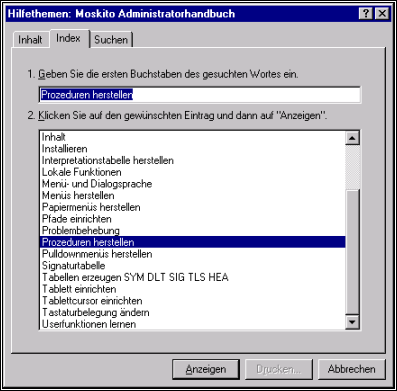
Es wird der "Finder" zu der Hilfedatei geöffnet. Zusätzlich wird die Lasche "Index" aktiviert und im Dialogfeld wird diejenige Überschrift markiert, die im Zusatzparameter <data> angegeben wurde.
Beispiel:
<ESC>WindowWinHelp ..\help\Admin.hlp HELP_KEY "Prozeduren herstellen"
HELP_HELPONHELP:
Es wird die vom Betriebssystem vorgesehene Hilfe zur Benutzung der Hilfe im Finder angezeigt.
HELP_CONTEXT <DATA>:
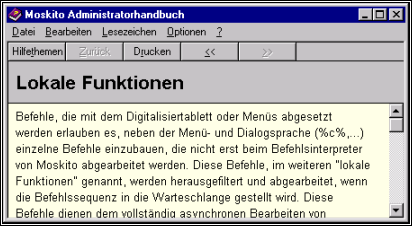
Es wird direkt das der unter <DATA> angegebenen Indexnummer entsprechende Hilfethema geöffnet. (wenn man also die Indexnummer kennt, ist es gut, wenn nicht, dann nicht).
Beispiel:
<ESC>WindowWinHelp ..\help\Admin.hlp HELP_CONTEXT 23
HELP_CONTEXTPOPUP <DATA>:
Es erscheint lediglich ein kleines Popup-Feld mit der Überschrift der unter <DATA> angegebenen Indexnummer.
Beispiel:

<ESC>WindowWinHelp ..\help\Admin.hlp HELP_CONTEXTPOPUP 23
HELP_PARTIALKEY <DATA>:
Es öffnet sich der Finder und unter der Lasche "Index" wird diejenige Überschrift markiert, die zu dem unter <DATA> angegebnen Textfragment am ehesten passt.
Beispiel:
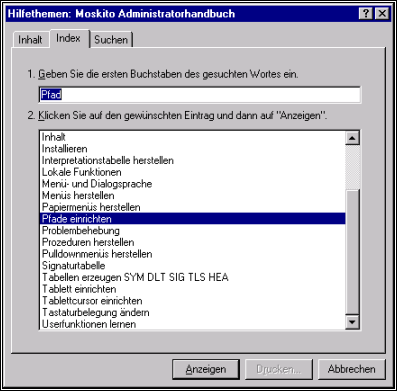
<ESC>WindowWinHelp ..\help\Admin.hlp HELP_PARTIALKEY Pfad
HELP_QUIT:
Eventuell noch offene Dialogfenster der Hilfe werden geschlossen.
<ESC>WindowStopOutput
Hält die Ausgabe im Inputfenster an.
Programmintern wird ein Flag gesetzt, mit dem bei der nächsten Ausgabe, die angefordert wird, eine Dialogbox über den Stop informiert. Erst wenn diese mit OK bestätigt worden ist wird die Ausgabe abgearbeitet und der Ablauf normal fortgesetzt. Die Dialogbox ist an das Graphikfenster gekoppelt, so daß im Kommandofenster beliebig gearbeitet werden kann.
<ESC>WindowScreenToClipboard
Der Inhalt des Grphikfensters wird als Bitmap in die Zwischenablage kopiert.
Die Größe der Bitmap ist die Größe des aufgezogenen Fensters. Es wird das Hauptfenster abgebildet. Durch das Darstellungsprinzip kann es vorkommen, daß um den Fensterausschnitt ein Bereich ungefüllt mit übertragen wird.
<ESC>WindowDataStart
Im Menü der Start von eingelagerten Daten.
<ESC>WindowToggleMenue id
Schaltet den Dialog <id> von sichtbar auf unsichtbar oder andersrum
<ESC>WindowHideMenue id
Schaltet den Dialog <id> von sichtbar auf unsichtbar
<ESC>WindowCloseMenue id
Entfernt den Dialog <id>
<ESC>WindowBrowseFile
<ESC>WindowBrowseFile <Startfilename> <Startdir> <Title> <Def.Ext> <Dest.field> (<Filter1> <Ext.1>) (<Filter2> <Ext.2>)
<ESC>WindowBrowseFile <Startfilename> <Startdir> <Title> <Def.Ext> <Dest.field> (<Filter1> <Ext.1>) (<Filter2> <Ext.2>) <flags>
Startet eine Filedialogbox und liefert die Datei als Ergebnis.
flags: Eine Liste mit Namen, die das Verhalten der Box beeinflussen. Die Namen dürfen keine Leerzeichen beeinhalten, die einzelnen Flags werden durch ; oder : getrennt.
OFN_OVERWRITEPROMPT: Wenn eine bereits existierende Datei usgewählt wird erscheint eine Nachfrage, ob diese überschrieben werden soll.
OFN_SAVEBOX: Statt der "Öffnen-Box" erscheint die "Sichern-Box"
OFN_FILEMUSTEXIST: Es kann nur eine existierende Datei ausgewählt werden.
OFN_CREATEPROMPT: Beim Eintragen eines Dateinamen, der nicht existiert, erscheint eine Nachfrage.
OFN_ALLOWMULTISELECT: Es können auch mehrere Dateien ausgewählt werden.
<ESC>WindowBrowseFolder
<ESC>WindowBrowseFolder <Dest.field> <StartDir>
Startet eine Dialogbox und liefert als Ergebnis ein Directory. Wenn Dest.field 0 ist wird das Ergebnis als Eingabe geliefert. Sonst wird das Ergebnis in das Dialogfeld mit dieser ID geschrieben.
<ESC>WindowBrowseFont
<ESC>WindowBrowseFont <Dest.field> <StartFont> {{<fontSize>} <charset>}
Startet eine Dialogbox und liefert als Ergebnis einen Font. Wenn Dest.field 0 ist wird das Ergebnis als Eingabe geliefert. Sonst wird das Ergebnis in das Dialogfeld mit dieser ID geschrieben. fontSize ist eine Feldnummer, in der die Ausgewählte Fontgröße abgelegt werden kann. Mit charset kann ein Feld für den Zeichensatz ausgewählt werden. Dabei steht 1 für „westliche Sprachen“, 163 für Vietnamesisch.
<ESC>WindowSoftBreak
Liefert eine Unterbrechung ( ^C). Dies geschieht asynchron, also sofort.
<ESC>WindowHardBreak
Liefert eine Unterbrechung. Dies geschieht asynchron, also sofort. Die Unterbrechung wird von Userfunktionen als wichtige Unterbrechung gewertet.
<ESC>WindowExtreemBreak
Moskito wird beendet. Es wird versucht, das Workfile vor dem Beenden zu sichern.
<ESC>WindowSendChar num
Das Zeichen mit der Ordinalzahl num wird ausgegeben.
<ESC>WindowCharToInput num
Das Zeichen mit der Ordinalzahl num wird in der Eingabezeile zugefügt.
<ESC>WindowSetFocus dialogID {feldID}
Der Eingabefokus wird dem entsprechenden Fenster zugeordnet. Mit dialogID==-1 wird als aktives Fenster das Protokollfenster gewählt, mit -2 das Grafikfenster. Wird feldID angegeben, so wird in diesem Dialog das Element mit der angegebenen feldID aktiviert.
<ESC>WindowSetDialogPos num x y w h
Die Größe und Position des angegebenen Fensters wird gesetzt.
(x,y) Fensterposition
(w,h) Fensterbreite und Fensterhöhe
Wenn x kleiner als 0 ist wird nur die Größe, bei w<0 nur die Breite gesetzt. Die Werte werden in logischen Einheiten angegeben, die Schriftgröße wird eingerechnet. Bei großen Fonts sind die hier angegebenen Werte in X-Richtung 10 Pixel je Dialogeinheit, in Y-Richtung 20 Pixel je Dialogeinheit, bei kleinen Fonts 8 und 16. Nullpunkt ist oben links.
<ESC>WindowSetPos num x y w h
Die Größe und Position des angegebenen Fensters wird gesetzt.
(x,y) Fensterposition
(w,h) Fensterbreite und Fensterhöhe
Wenn x kleiner als 0 ist wird nur die Größe, bei w<0 nur die Breite gesetzt. Die Werte werden in Pixel angegeben. Nullpunkt ist oben links.
<ESC>WindowBrowseColor dest color
Es wird ein Farbauswahldialog angezeigt. Der Dialog beginnt mit der Farbe color, wobei dies eine Hexzahl sein muß. Wird dest mit 0 angegeben, so wird das Ergebnis als Hexzahl ausgegeben, sonst stellt dest die Nummer des Dialogfeldes dar, in das die Zahl eingetragen werden soll.
<ESC> WindowSeparatLines
Wie bei WindowDataStart werden Zeilen als Separate Nachrichten ausgegeben. Dies gilt nun bis zum Ende dieser Funktion
<ESC> WindowSetMenuEntry <win-id> <menu-art> "<menu-string>" "<new-text>" <feldID> <spalte>
Setzt auf Ebene des Bildschirmprozesses den Inhalt von Dialogfeldern.
<ESC> WindowExecCommand "<menu-string>"
Befehl ausführen.
Dieser Befehl wird vollständig asynchron ausgeführt. Er darf keine Funktionen enthalten, die gerade laufenden Synchronen Befehlen die Grundlage entziehen, etwa das Löschen eines Objekts.
<menu-string> darf Zeilenvorschübe enthalten.
--------------------OLD_TEXT---------------------
The orders which are set down with the Digitalisiertablett or menus allow to insert single orders beside the menu and Dialogsprache (%c %...) which are not processed only with the Befehlsinterpreter by Moskito. These orders, in the other ”local function” called, are filtered out and processed if the order sequence is put in the queue. These orders serve the completely asynchronous treatment of orders. It concerns only a tiny amount of special orders, possibly the break function which cannot wait principle-conditioned for synchronous processing. All local functions <>must begin with an <ESC >sign to be recognised as those. All these orders begin with Window to hold them separately recognizable:
<ESC>WindowWinHelp <file> <command> <data>
Order to the access to the help file which <>must be given under <file> with her complete path. In addition there is a row of different commands <command> and if necessary according to command Zusatzparameter <data>. At the moment the following commands are supported:
HELP_CONTENTS: The respective table of contents is opened. Example is the opening of the help file in the standard menu with:
<ESC>WindowWinHelp. \\help \\syshelp.hlp HELP_CONTENTS 0
HELP_FINDER: The "finder" is opened to the help file (dialogue box with the lax "contents", "index" and "searches"). Lax "contents" are, besides, lies in front.
<HELP_KEY DATA>: The "finder" is opened to the help file. In addition, the lax "index" is activated and in the dialogue field that heading which <>was given in the additional parametre <data is marked<>. Example:
<ESC>WindowWinHelp.\help\Admin.hlp "Procedures HELP_KEY produce"
HELP_HELPONHELP: The help intended by the operating system is indicated to the use of the help in the finder.
<HELP_CONTEXT DATA>: This <>is opened directly to the <>index number given under <DATA> suitable help subject. (if one knows the index number, it feels well, if not, then not).
Example:
<ESC>WindowWinHelp.\help\Admin.hlp HELP_CONTEXT 23
<HELP_CONTEXTPOPUP DATA>: There appears only one small field Popup with the heading of the <>index number given under <DATA>.
Example:
<ESC>WindowWinHelp.\help\Admin.hlp HELP_CONTEXTPOPUP 23
<HELP_PARTIALKEY DATA>: It opens the finder and under the lax "index" that heading which <>fits to the <>text fragment angegebnen under <DATA> in the earliest one is marked<>.
Example:
<ESC>WindowWinHelp.\help\Admin.hlp Path HELP_PARTIALKEY
HELP_QUIT: Perhaps, still open dialogue windows of the help are closed.
<ESC>WindowStopOutput
If the issue stops in the input window.
Program-inside a Flag is put with which is requested the next issue, a dialogue box about the stop informs. Only if she has been confirmed with OK the issue is processed and the expiry is continued normally. The dialogue box is coupled near the graphic arts window, so that can be worked in the command window arbitrarily.
<ESC>WindowScreenToClipboard
The contents of the Grphikfensters are copied as a bitmap in the clipboard.
The size of the bitmap is the size of the drawn up window. The main window is illustrated. By the representation principle it can seem that around the window cutting an area will transfer unfull with.
<ESC>WindowDataStart
In the menu the start of stored data.
<ESC>WindowToggleMenue id
Switches the dialogue <id> from obviously on invisibly or the other way round
<ESC>WindowHideMenue id
Switches the dialogue <id> from obviously on invisibly
<ESC>WindowCloseMenue id
Removes the dialogue <id>
<ESC>WindowBrowseFile
<ESC>WindowBrowseFile <Start file name> <Startdir> <Headlining> <Def. Ext> <Dest.field> <(Filter1> <Ext.1>) <(Filter2> <Ext.2>)
If a file dialogue box starts and delivers the file as a result.
<ESC>WindowBrowseFolder
<ESC>WindowBrowseFolder <Dest.field> <StartDir>
If a dialogue box starts and delivers as a result a Directory. If Dest.field 0 is the result is delivered as an input. But the result is written in the dialogue field with this ID.
<ESC>WindowBrowseFont
<ESC>WindowBrowseFont <Dest.field> <StartFont> {<{fontSize>} <charset>}
If a dialogue box starts and delivers as a result a Font. If Dest.field 0 is the result is delivered as an input. But the result is written in the dialogue field with this ID. fontSize is a field number in which the well-chosen Fontgröße can be filed. With charset a field can be selected for the font. Besides, stands 1 for „western languages“, 163 for Vietnamese.
<ESC>WindowSoftBreak
If delivers an interruption (^C). This happens asynchronously, so immediately.
<ESC>WindowHardBreak
If delivers an interruption. This happens asynchronously, so immediately. The interruption is evaluated by user's functions as an important interruption.
<ESC>WindowExtreemBreak
Moskito is finished. It is tried to protect the Workfile from finishing.
<ESC>WindowSendChar num
The sign with the ordinal num is given.
<ESC>WindowCharToInput num
The sign with the ordinal num is added in the input line.
<ESC>WindowSetFocus dialogID {feldID}
The input focus is assigned to the suitable window. With dialogID ==-1 the protocol window is chosen as an active window, with-2 the graphics window. It is given feldID, the element with given feldID is activated in this dialogue.
<ESC>WindowSetDialogPos num x y w h
The size and position of the given window is put.
(x, y) window position
(w, h) window width and window height
If x smaller than 0 is only the size, with w<0 becomes <only the width sedate. The values are given in logical unities, the type-size is included. With big Fonts the values given here are in X direction 10 pixels dialogue unity, in Y direction 20 pixels dialogue unity, with small Fonts 8th and 16th zero is on top on the left.
<ESC>WindowSetPos num x y w h
The size and position of the given window is put.
(x, y) window position
(w, h) window width and window height
If x smaller than 0 is only the size, with w<0 becomes <only the width sedate. The values are given in pixel. Zero is on top on the left.
<ESC>WindowBrowseColor dest colour
A colour choice dialogue is indicated. The dialogue begins with the colour colour and this one Hexzahl must be. It is given dest with 0, the result is given as a Hexzahl, but explains dest the number of the dialogue field on which the number should be put down.
<ESC> WindowSeparatLines
As with WindowDataStart lines are given as separate news. Now this is valid up to the end of this function
<ESC> WindowSetMenuEntry <win-id> <menu kind of> "<menu string>" "<new text>" <feldID> <splits>
Puts on level of the screen process the contents of dialogue fields.
<ESC> WindowExecCommand "<menu string>"
Order explain.
This order is explained completely asynchronously. He may contain no functions, the just running synchronous orders the basis take away, possibly the extinguishing of an object.
<menu string> may contain line feed.