The Tastenbelegungen for the tray cursor become by a Batchdatei in the list Moskito\Rahmen\Batch\Keys defines. Afterwards the suitable Batchdatei is able about the menu Administer | Settings | Worldwide in the window "Digitizertasten" as a standard for the key allocation are selected. Then after the renewed starting of Moskito this new key allocation is valid.
Every single key of a cursor delivers by her release to Moskito a specific number, the CursorKey. Now to each of these numbers is able in the Batchdatei with the order
SetCursorKey <number> "<order string>"
a certain function are assigned. As a rule are this eight Standardtastenbelegungen CLS, IBID., RPT, CON and P, L, R, C.
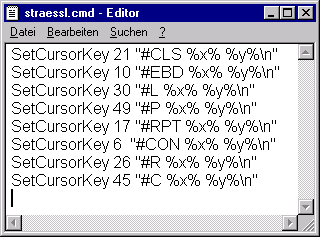
If on the available tray cursor exist more than eight keys, it is worthwhile under circumstances to lay functions often to be applied on the free keys in the Digitalisierprozess.
Besides, is to be noted that the numbers delivered by the cursor stand in no logical order and also do not agree with the names on the cursor itself. Hence, it is advisable to try out first all free cursor keys under Moskito and to take down in each case the number appearing in the command window of the suitable cursor key. Afterwards the new Tataturbelegung can be defined in the Batchdatei. Have to do, for example, a key which delivers the value 23, in future the order "Graphic arts window anew sign" explain, the following new line is to be given in the Batchdatei:
SetCursorKey 23 "DRA\n"
The sign result \n stands for "new line" and corresponds to a line feed (Enter) in the command line.